release:
26 best paperless software packages for your business
The best paperless software helps businesses move away from manual processes and manage documents in a faster, more reliable way. From storing files to handling approvals, these tools replace paper with systems that are easier to scale and control.
In this guide, we break down what the best paperless software actually does, why companies are adopting it, and what features matter most. We’ll also review 26 best paperless software solutions across key categories to help you find the right fit.
See why businesses are rushing to SignTime’s feature-packed contract repository system.
What is meant by paperless document management?
Paperless document management means handling documents digitally instead of using physical paper. It includes creating, storing, sharing, and organizing files within software systems designed to keep information accessible and secure.
The best paperless software replaces manual filing with structured digital workflows. This makes it easier for teams to find documents, track changes, and manage records without relying on physical storage.
Why are companies switching to paperless document management?
Companies are moving away from paper because it slows down work and creates unnecessary risk. Physical documents are easy to lose, hard to track, and difficult to share across teams. The best paperless software solves these problems by making documents available instantly and keeping them organized in one place.
The shift also supports modern work environments. Teams need to collaborate across locations, meet compliance standards, and respond quickly to changes. Digital systems make this possible while reducing the time spent on manual tasks.
What are the benefits of paperless document management?
Adopting a digital approach changes how work gets done across the entire business. The best paperless software improves speed, accuracy, and control over your documents. It also reduces the friction that comes with manual processes.
Here are some of the main advantages of utilizing paperless software:
- Faster access: Employees can find and open documents in seconds without searching through physical files.
- Lower operating costs: Businesses spend less on paper, printing, storage, and shipping.
- Improved organization: Files are stored in structured systems that make them easy to sort and retrieve.
- Stronger data security: Digital platforms provide access controls, encryption, and activity tracking.
- Real-time collaboration: Teams can work on the same document at the same time from different locations.
- Better compliance: Records are easier to track, retain, and audit when they are stored digitally.
- Faster approvals: Automated workflows reduce delays in reviews and sign-offs.
- Reduced physical storage: Offices no longer need large filing systems to store documents.
- Remote accessibility: Staff can access documents securely from anywhere with an Internet connection.
- Fewer manual errors: Automation helps prevent issues like lost files or outdated versions.
- Easier scaling: Digital systems grow with your business without adding physical overhead.
- Environmental impact: Reducing paper use supports sustainability goals.
26 best paperless software packages you should consider
Choosing the best paperless software depends on how your business handles documents and workflows. Some tools focus on collaboration, while others are built for content control, automation, or contract management. Understanding these differences makes it easier to select the right solution.
To help you compare, we’ve grouped 26 best paperless software options into the following categories:
- Cloud contract management and e-signature platforms
- Collaboration and document sharing platforms
- Enterprise content management systems
- IT and productivity tools with document management features
- Specialty and industry-specific solutions
- Workflow automation and digital process platforms
Cloud contract management and e-signature platforms
These tools focus on handling contracts and approvals in a fully digital environment. They help businesses create, send, sign, and store agreements without relying on paper. The best paperless software in this category improves speed, visibility, and control over critical documents.
- SignTime
SignTime
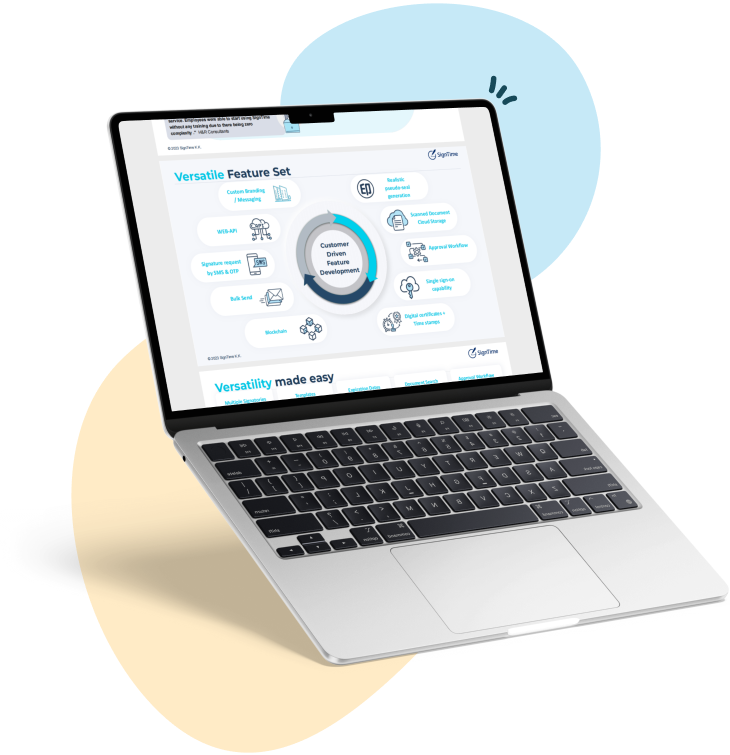
SignTime is Japan’s leading e-signature and contract management solution, built to simplify how businesses manage agreements. It supports multiple ways to create signatures, including uploads, auto-generated text, and a patented drawing tool. SignTime integrates with Salesforce and includes structured approval systems, making it suitable for both local and global operations. It also supports long-term e-signatures and digital hanko, which can be important for companies working with Japanese partners.
Collaboration and document sharing platforms
These platforms focus on helping teams work together on documents in real time. They combine file storage with editing, sharing, and communication features. Many businesses rely on these tools as part of the best paperless software stack to keep work moving across teams and locations.
- Microsoft SharePoint
- Google Workspace
- Box
- Dropbox Business
- Slack
Microsoft SharePoint
Microsoft SharePoint provides document management and collaboration within the Microsoft ecosystem. It allows teams to store files, control access, and build internal sites for sharing information. Many organizations choose it for its deep integration with other Microsoft tools.
Google Workspace
Google Workspace offers cloud-based applications for creating and managing documents online. Tools like Docs, Sheets, and Drive allow teams to collaborate in real time. It is widely used for its simplicity and ease of access across devices.
Box
Box delivers secure cloud content management with strong file sharing capabilities. It includes workflow features and integrates with many business applications. Companies often use it to manage documents while maintaining strict security controls.
Dropbox Business
Dropbox Business combines cloud storage with file sharing and collaboration tools. It allows teams to access and manage documents from different devices. Its simple interface makes it easy to adopt across organizations.
Slack
Slack is a communication platform that supports document sharing through integrations with storage tools. Teams use it to keep conversations and files connected in one place. This helps reduce delays and keeps work organized.
Enterprise content management systems
Enterprise content management (ECM) systems provide comprehensive solutions for organizing, storing, and tracking large volumes of documents and digital content. Businesses use these platforms to maintain security, compliance, and scalability while managing important information. They are often part of the best paperless software strategies for mid-to-large organizations.
- M-Files
- OpenText Content Suite
- Laserfiche
- Alfresco
- IBM FileNet
M-Files
M-Files uses a metadata-driven approach to organize documents, making it easy to locate files without relying on traditional folder structures. It offers workflow automation and integrates with popular business applications, improving efficiency and compliance.
OpenText Content Suite
OpenText Content Suite is a robust ECM platform designed for enterprise-grade document management and regulatory compliance. It supports complex workflows and integrates with other systems to streamline content processes.
Laserfiche
Laserfiche combines digital document management with business process automation. It helps companies digitize paper documents, automate workflows, and maintain governance efficiently.
Alfresco
Alfresco is an open-source ECM solution that supports document management, collaboration, and workflow automation. It is favored by companies seeking flexible and scalable content management.
IBM FileNet
IBM FileNet provides enterprise-level document and content management with strong security features. It supports large-scale operations and complex compliance requirements, making it suitable for regulated industries.
IT and productivity tools with document management features
These platforms combine document management with productivity and organizational tools. They are ideal for teams that need flexible ways to organize information, manage tasks, and collaborate while keeping documents secure. Many businesses consider these tools part of the best paperless software because they streamline both workflow and content management.
- Notion
- Evernote Business
- Zoho Docs
- Monday.com
- Airtable
Notion
Notion is an all-in-one workspace that lets teams create documents, databases, and project boards. Its flexibility allows businesses to structure information and workflows in ways that match their unique processes.
Evernote Business
Evernote Business focuses on note-taking and digital organization. It enables team collaboration, making it easier to access and manage information across multiple devices.
Zoho Docs
Zoho Docs provides cloud-based document storage and editing as part of the Zoho ecosystem. It integrates with other Zoho apps to create a cohesive document and workflow management system.
Monday.com
Monday.com combines project management and document sharing. Teams can coordinate tasks, track progress, and store relevant documents in a single centralized platform.
Airtable
Airtable blends spreadsheet functionality with database features, giving teams flexibility to organize documents and data. Its integrations and workflow options make it useful for automating document-related tasks.
Specialty and industry-specific solutions
These platforms are designed for particular industries or business needs. They often include specialized compliance tools, workflow customizations, or features tailored to smaller teams or niche markets. Many organizations include them in their list of best paperless software to meet unique operational requirements.
- DocuWare
- FileCenter
- eFileCabinet
- Nitro
DocuWare
DocuWare provides digital document management with workflow automation, making it ideal for mid-sized businesses. It streamlines routine tasks and helps ensure compliance with industry regulations.
FileCenter
FileCenter is focused on small business document management. It combines scanning, organization, and search tools in a single, user-friendly platform.
eFileCabinet
eFileCabinet offers cloud-based filing and workflow management. Its emphasis on security and automation helps teams manage documents efficiently.
Nitro
Nitro delivers PDF productivity tools along with document management capabilities. It is widely used for editing, converting, and digitally signing documents.
Workflow automation and digital process platforms
These platforms help businesses automate repetitive tasks and streamline document-related processes. By connecting different tools and workflows, they reduce manual effort, improve accuracy, and support teams in managing documents more efficiently. They are often considered essential components of the best paperless software strategy.
- Kissflow
- Nintex
- ProcessMaker
- Pipefy
- Zapier
- Microsoft Power Automate
Kissflow
Kissflow provides a no-code platform to design and automate workflows. It helps organizations digitize document approvals, routing, and other business processes quickly and efficiently.
Nintex
Nintex focuses on workflow automation, document generation, and process mapping. It integrates with common business applications to simplify complex tasks and improve productivity.
ProcessMaker
ProcessMaker offers open-source and cloud-based workflow automation for document routing and approvals. Its customizable platform supports diverse business processes.
Pipefy
Pipefy combines workflow management with document organization. Teams can automate task assignments, track progress, and manage documents in real time.
Zapier
Zapier connects apps and automates repetitive tasks without coding. It enables seamless synchronization of documents and actions across multiple platforms.
Microsoft Power Automate
Microsoft Power Automate allows users to automate workflows across Microsoft and third-party applications. It supports document approvals, notifications, and data integration for streamlined processes.
SignTime enhances your best paperless software strategy
SignTime stands out as a versatile solution for businesses seeking the best paperless software. It combines contract management, flexible e-signatures, and structured approval workflows to streamline document handling across teams.
With multiple signature options, Salesforce integration, and features like long-term e-signatures and digital hanko, SignTime helps companies move away from paper while maintaining security, compliance, and efficiency. It supports both local Japanese workflows and global operations, making it a strong choice for businesses of all sizes.
Download our brochure to see whether SignTime might be a fit for your organization.